
Your neighbour is going
the same way as you.
Every day.
Society Rides connects residents of the same housing society for shared commutes — people you already know, going where you're going.
Society Rides connects residents of the same housing society for shared commutes — people you already know, going where you're going.
Your neighbour has already set up your society. You just need the code they shared with you — and about five minutes.
Take a clear photo of your driving licence right now and save it to your phone. You'll be asked to upload it partway through signup — having it ready means you finish registration in one smooth run, instead of stopping halfway to go find it.
Society Rides works on Android, iPhone, and any laptop or desktop browser. Pick the option that suits your device below.

On the first screen after registration, choose residential, then choose Invite code, then you'll see a box to enter your invite code — the 5-character code your neighbour shared with you. Type it in and tap Join.
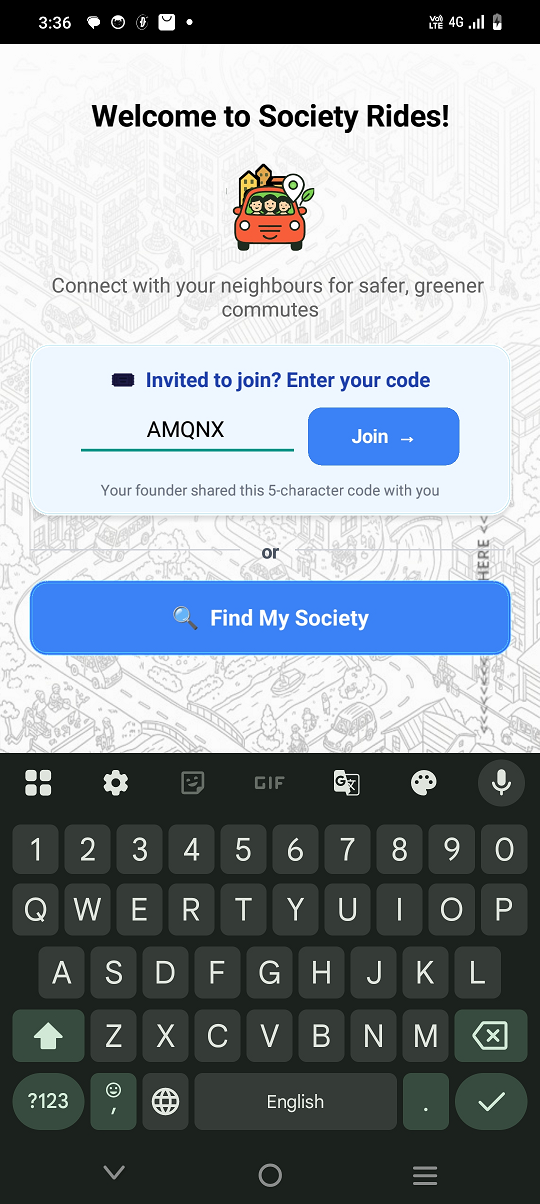

Enter your flat number and choose how you'd like to participate — as a Rider (you need rides), Driver (you can offer rides), or Both. Both is good.

Upload a clear photo of your driving licence for verification. Your licence details stay private — your neighbours only ever see your name and profile photo, not the licence number.
Once uploaded, tap Continue to Verification. Your account is activated.

You are now a full member of your society. You can now search rides, post rides, see who's going your way, and request seats. All features accessible.
"A neighbour is heading to Ballygunge in a red Maruti Brezza. Three seats available. ₹50 contribution optional. One tap to request."

These aren't needed to search and join rides. Come back to them when you want to start driving your neighbours.
Add at least one vehicle before you can post a ride. Include the make, model, colour, and registration number so your neighbours can spot you easily.

Both Drivers and Riders may please complete their Profile at leisure. Add a profile photo and an emergency contact. Profiles with a photo earn trust faster — rides get confirmed more quickly when neighbours can see who they're travelling with.

Download Society Rides, enter the code your neighbour shared, and you're in — in under five minutes.
⬇️ Download on Google Play 🌐 Open Web App (iPhone / Laptop)